A 4K Capture Card, a MacBook and a Very Simple Cable
Tamás pointed out that there was a lack of clarity regarding the possibility to, for example, mute music from the gaming PC, or to toggle scenes inside OBS.
I did not understand at first, but sure, when you are in the game, mouse and keyboard are connected to the gaming PC. How would you interact with the stream then, without connecting a second pair of peripherals to the streaming PC?
There are different approaches to that, one could be a Stream Deck, a shortcut keyboard which could easily replace a second keyboard.
Another option could be remote desktop connections, mouse sharing, kvm switches…you name it.
But again we hit the overcomplication layer of our brains and realized: the streaming computer is a Macbook.
It’s turned on, it’s screen is being used anyway…why not use the keyboard and touchpad that are built-in. 🤦
You miss the forest for the trees sometimes.
My friend Tamás wanted to add a 4K capture card to his streaming setup and hand streaming duties over to his M1 MacBook Pro, while his gaming PC stays dedicated to just running the game.
We got on a Discord call to plan the wiring and ended up spending over an hour on it - not because the hardware was complicated, but because of one very persistent question: how does audio work?
How do headphones receive game sound from gaming PC when connected to MacBook, how does game running on gaming PC receive microphone (mixdown, with effects, if possible, connected to MacBook) when running on gaming PC?
Questions over questions…and so many possible answers…
The Goal
Split the two jobs across two machines. That is nothing new to anyone who read about streaming, to which platform ever, many professional people have a two-PCs-setup.
The gaming PC only games, nothing else running on it eating frames.
The capture card grabs the PC’s HDMI output in a future-proof manner, 4k@60 at least, better even with high refresh rate while not necessary at the moment.
Because Tamás only has old, working-grade, non-gaming displays at the moment, relics from long forgotten pasts and we all were there Gandalf, 3000 years ago.
The MacBook does the actual streaming: OBS, encoding, overlays, chat, the works.
On paper that’s a simple pipeline. In practice it means webcam, mic, headset and even keyboard and mouse now have to be sorted between two computers that don’t share anything except a couple of cables.
The Diagram
To keep track of what plugs into what, I threw the whole thing into D2 .
It’s a diagram-as-code tool from Terrastruct: you describe boxes and arrows in a small text format and it renders you a clean SVG or PNG - no dragging boxes around in a GUI, and the diagram lives in a text file you can version and diff like code.
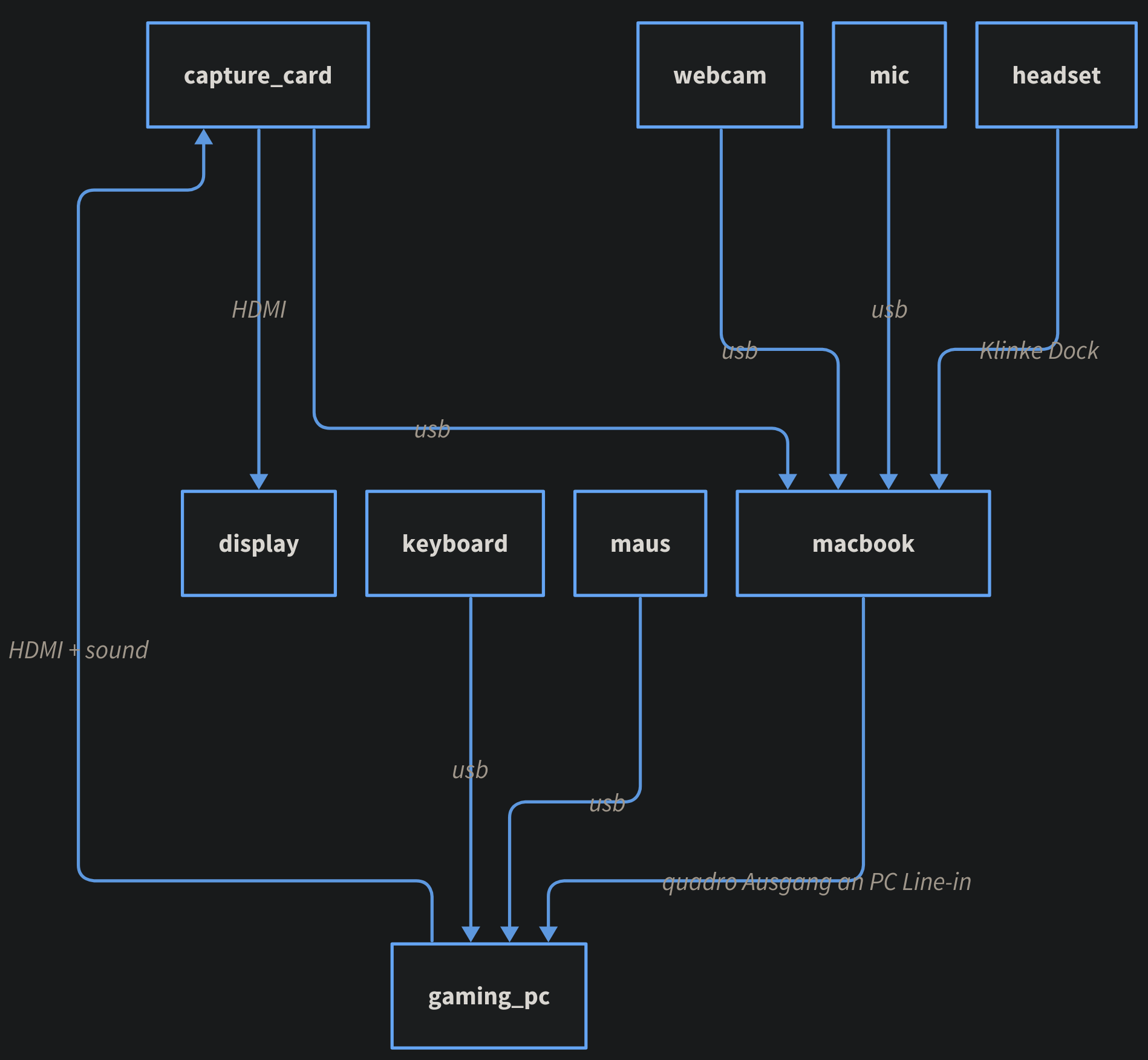
The full wiring: capture card, MacBook and gaming PC
Walking through it:
capture_cardtakes the gaming PC’s video and audio over HDMI, forwards the picture to thedisplayvia a second HDMI cable, and pushes the capture feed to themacbookover USB.webcamandmicplug straight into themacbookvia USB.headsetplugs into themacbooktoo, but through the audio jack on Tamás’s dock (Klinkeis just German for “jack”).keyboardandmaus(German for mouse) stay on thegaming_pc, since that’s what he’s actually playing on.macbooksends its output back into thegaming_pc’s line-in - more on that below, it’s the piece that took us an hour to get to.
The Audio Problem
Two things had to work at the same time:
a) Game sound needs to reach the headset - which is physically plugged into the MacBook, not the gaming PC.
b) The mic needs to reach the gaming PC too, so it shows up in the game’s own voice chat, not just on stream.
Simple on a diagram, less simple when the two computers involved have zero shared audio hardware.
What We Considered
We went through most of the usual suspects:
- SonoBus - peer-to-peer low-latency audio over the network. Works, but it’s another app to keep alive and configured correctly on both ends. Network connectivity could become an issue for ingame voice and therefore maybe even the recording of the same.
- VBAN - similar idea, audio-over-IP, same “one more moving part” concern.
- Physical splitters - taking the dock’s combined jack and trying to break it out into separate mic and headphone lines, dual-usb splitters and whatever doohickeys come to mind
That last one sent us down a rabbit hole about the dock’s audio jack being a 4-pole TRRS connector, carrying stereo out and mic in on one plug - four conductors, we got increasingly elaborate about splitting it apart correctly.
The Fix
Then it clicked: the MacBook has its own audio jack. The gaming PC has a line-in. Why not just run a cable between them? Jack to jack, MacBook headphone-out into gaming PC line-in.
No app, no network hop, no latency, no quadrophonic splitter cable. The MacBook mixes whatever it needs to send back (mic included) and the gaming PC just hears it on its line-in as if it were any other audio source.
We’d spent the better part of an hour circling software solutions for a problem a 2€ cable solved outright.
If you want to see the result in action, Tamás streams over at twitch.tv/einfachtamas - go say hi! 🎥